Scoreboard - Keep score
4.8163.00Reviews
Analysis ByAppCompare
If you've ever found yourself in the middle of a heated game night, trying to keep track of scores with bits of paper scattered around, then Scoreboard - Keep score might just be your new best friend. This nifty app, available for both Android and iOS, aims to make scorekeeping as effortless as possible, leaving you to focus on the fun part: winning the game!
Getting Started with Scoreboard - Keep score
First things first, downloading and setting up Scoreboard - Keep score is a breeze. Head over to the App Store or Google Play, and in just a few taps, you're ready to roll. Once installed, the interface welcomes you with a clean and intuitive layout. It’s like the app knows you’re here for a good time, not a long tutorial session.
Upon opening, you’re greeted with options to create a new game or continue with an existing one. The app supports multiple games, so whether you’re a fan of board games or sports, it has you covered. I love how you can customize each game with player names and even add rounds or periods. It's almost like having a personal scorekeeper in your pocket!
User-Friendly Interface
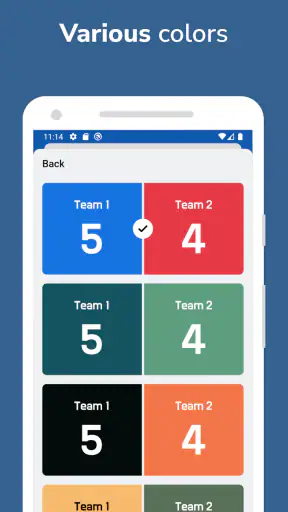
The interface of Scoreboard - Keep score is as straightforward as it gets. The developers have clearly focused on making it user-friendly, even for the less tech-savvy among us. Each button is clearly labeled, and the color scheme is easy on the eyes. I found the navigation to be seamless, with no unnecessary bells and whistles to distract from the core function of the app.
One of the standout features is the ability to save your game progress. This is especially useful for those epic games that stretch over several days. Just save your progress and pick up where you left off, hassle-free. Talk about convenience!
Customizable Features
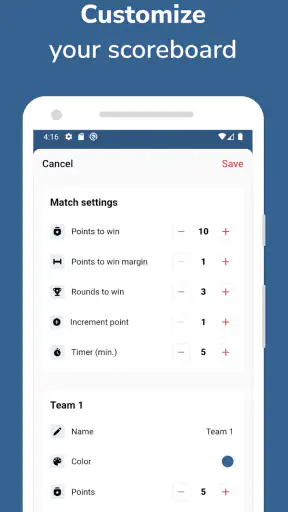
Customization is where Scoreboard - Keep score truly shines. You can tweak almost every aspect of the game setup. From selecting the number of players to naming each participant, the app allows for a personalized experience. There’s even an option to set different scoring systems, which is perfect for adapting to specific game rules or personal preferences.
Another neat feature is the history log. This allows you to review past games, which is perfect for those who like to keep track of performance over time. It’s like having a game historian at your disposal!
Seamless Performance
Performance-wise, Scoreboard - Keep score runs smoothly without any noticeable lags or crashes. It’s lightweight and doesn’t hog your phone’s resources, which is a huge plus. Whether you're using an older device or the latest smartphone, the app maintains its efficiency, ensuring that your game nights go off without a hitch.
One minor hiccup I noticed was occasional ads in the free version. While they're not overly intrusive, they can be a slight distraction during intense moments. However, the option to upgrade to an ad-free version is always available for those who prefer an uninterrupted experience.
Conclusion: A Must-Have for Game Enthusiasts
In conclusion, Scoreboard - Keep score is an essential tool for anyone who enjoys competitive games. Its ease of use, coupled with its robust features, makes it a standout choice in the sea of scorekeeping apps. Whether you're hosting a casual game night or engaging in serious tournament play, this app has the tools you need to keep things running smoothly.
So, next time you find yourself reaching for a pen and paper to keep score, remember that there’s an app for that. Download Scoreboard - Keep score, and let it handle the math, so you can focus on having fun!
FAQ
What is Scoreboard - Keep Score, and how does it function?
Scoreboard - Keep Score is a versatile app designed to help users keep track of scores for various sports and games. It offers customizable scoring options and an intuitive interface, making it easy to use for both casual games and competitive sports. The app supports multiple players and teams, allowing users to manage scores seamlessly.
Is Scoreboard - Keep Score available for both Android and iOS devices?
Yes, Scoreboard - Keep Score is available for download on both Android and iOS platforms. Users can find it on the Google Play Store and the Apple App Store. The app is designed to work smoothly on a wide range of devices, ensuring accessibility for all users.
What features does Scoreboard - Keep Score offer to enhance user experience?
The app offers a variety of features, including customizable scoreboards, easy score adjustments, and support for multiple games and sports. It also provides options for timer settings, match history tracking, and sharing scores with friends. The user-friendly design ensures a smooth and enjoyable experience.
Are there any in-app purchases or ads in Scoreboard - Keep Score?
Scoreboard - Keep Score offers a free version with ads, but users can opt for an ad-free experience by purchasing the premium version. The premium version might also unlock additional features and customization options, enhancing the overall functionality of the app.
How user-friendly is Scoreboard - Keep Score for new users?
The app is designed with simplicity in mind, ensuring that even new users can navigate it easily. With a clear layout and intuitive controls, setting up and managing scores is straightforward. The app also provides helpful tutorials and support to assist users in getting started quickly.
Pros
- User-friendly interface for quick access.
- Supports multiple score tracking simultaneously.
- Customizable settings for different games.
- Offline functionality for remote locations.
- Lightweight app with minimal battery usage.
Cons
- Limited to basic scorekeeping features.
- No integration with other apps or devices.
- Lacks advanced analytics or statistics.
- Free version contains ads.
- No cloud sync for score history.